Digital
Why OpenAI is hiring 100 ex-bankers: Inside the ChatGPT-maker's secret project to automate Wall Street's grunt work
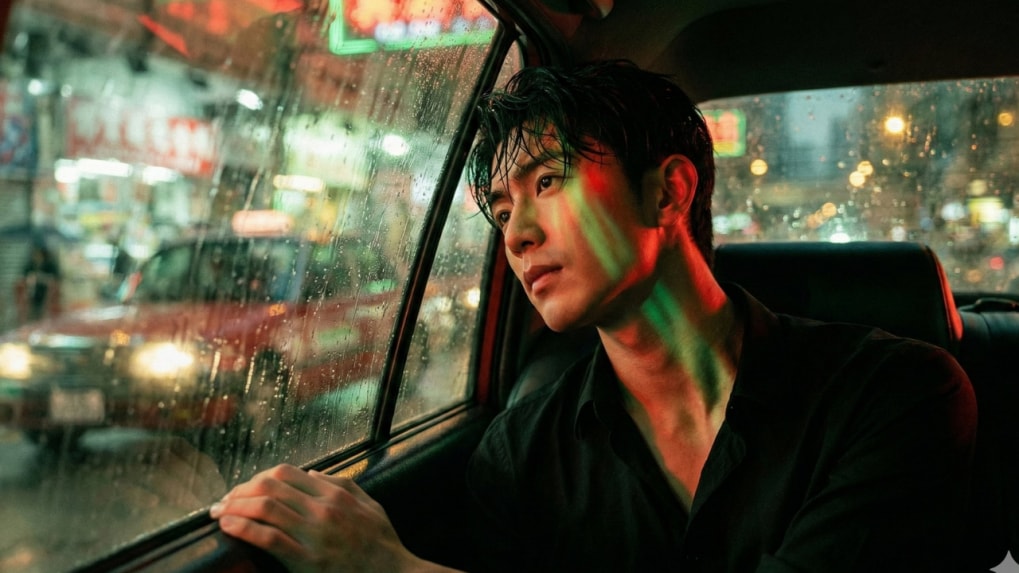
Nano Banana has emerged as one of the fastest-growing AI image trends on social media, with its highly stylised prompts regularly going viral on X. At the same time, Google Gemini’s image-generation capabilities have matured significantly, allowing users to create photorealistic, cinematic visuals using simple text prompts and reference photos. One of the most shared styles from Nano Banana Labs is the “lonely big-city” frame inspired by filmmaker Wong Kar-wai, which transforms everyday selfies into moody, film-like portraits.
Below is a step-by-step guide to recreating this visual using the Google Gemini app and a Nano Banana Pro prompt, based on instructions shared by Nano Banana Labs (@NanoBanana_Labs) on X.
Step 1: Download and open the Google Gemini app
Download the Google Gemini app from the Google Play Store or the Apple App Store. Once installed, open the app and sign in to your Google account.
Step 2: Open the image creation tool
On the home screen, tap the “Create image” option. This opens the interface where you can upload reference images and enter detailed prompts.
Step 3: Upload your selfie
Tap the plus (+) icon, choose Gallery, and select a photo of yourself. For best results, use a clear image where your face fills around 70% of the frame, with minimal shadows or obstructions.
Step 4: Copy a Nano Banana Pro prompt
Visit the Nano Banana Labs X account (@NanoBanana_Labs) and browse through their posts. Choose a visual you like and copy the full prompt text from the post description.
Step 5: Paste the prompt into Gemini
Return to the Gemini app and paste the copied text into the “Describe your image” field, ensuring your selfie is attached as the reference image.
Step 6: Generate your cinematic portrait
Tap the generate button to create the image. Gemini will render a cinematic portrait using your facial reference while applying the Nano Banana Pro styling.
Use the prompt below as shared by Nano Banana Labs for the intended cinematic effect:
Wong Kar-wai Style Cinematic Portrait A photorealistic, cinematic portrait in the style of Wong Kar-wai, using the uploaded image as a face reference. Emphasize the jawline and neck to be sharp, almost sculptural, while maintaining the original facial features and identity. Pose: Sitting, head leaning against the window, hands resting on the edge, eyes gazing wistfully at the streetlights. Setting: Inside an old taxi with faded leather seats. The window is fogged with rain, and streetlights are streak blurred in the background. Camera Angle: Shot from outside the window, with reflections layered over the face. Lighting: Red-green neon lights streaking across, causing the face to change color with the passing light. Attire: A slightly unbuttoned black shirt, wet hair. Image Tone: High red-green contrast, heavy film grain, pronounced motion blur, a soft glow around car lights. Mood: Lonely, isolated, a silent big city.
From purpose-driven work and narrative-rich brand films to AI-enabled ideas and creator-led collaborations, the awards reflect the full spectrum of modern creativity.
Read MoreIn a wide-ranging interview with Storyboard18, Sorrell delivers his frankest assessment yet of how the deal will redefine creativity, media, and talent across markets.