
How to generate real-time weather visuals with Google’s Nano Banana Pro: A guide to the top prompts
Users are creating striking real-time weather visuals of their cities using Nano Banana Pro’s generative abilities.

ADVERTISEMENT
Google’s Nano Banana Pro, launched last month, has quickly earned a reputation as one of the most capable image generators and editors currently available. With seamless integration into Google Search and advanced text-rendering capabilities, the model has become a go-to tool for producing high-quality infographics in seconds.
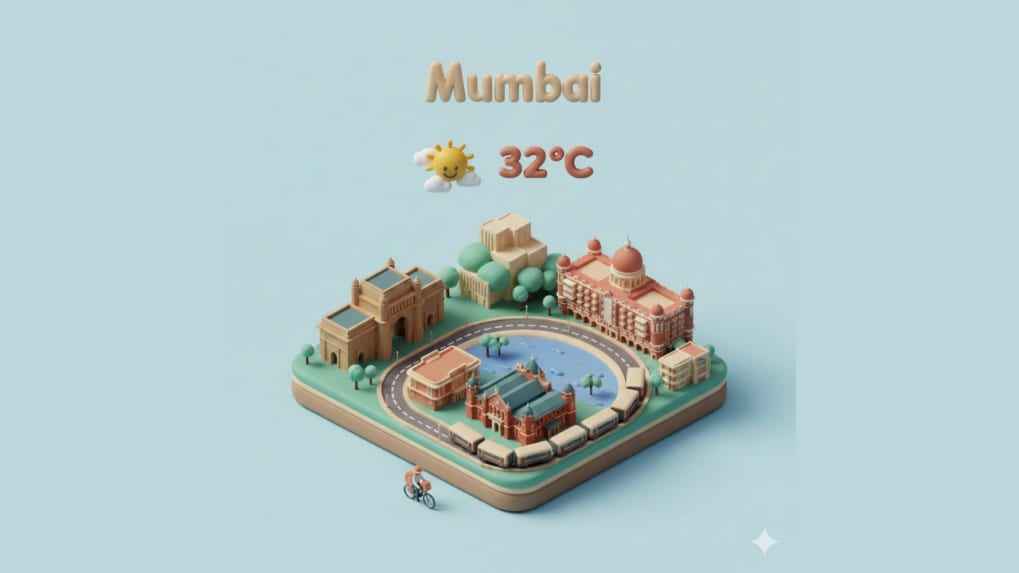
A new social media trend, however, is pushing the model even further, as users are creating striking real-time weather visuals of their cities using Nano Banana Pro’s generative abilities. For those keen to experiment with the format, here are some of the most effective prompts circulating online—slightly refined for clarity but faithful to the original intent.
Prompt 1
“Create a high-fidelity, Airbnb-like 3D isometric miniature of [city]. Use a 45° top-down perspective with soft, skeuomorphic design cues and ‘claymorphism’ textures—rounded edges, matte surfaces and tactile PBR materials. Incorporate key landmarks and use soft, diffused, studio-style lighting with gentle ambient-occlusion shadows. At the top centre, place the city name in the local script, rendered in bold, bubbly 3D lettering. Beneath it, include a glossy 3D weather icon reflecting current conditions, along with the temperature. Use a clean pastel background to maintain a minimalist, premium interface aesthetic.”
Prompt 2
“Produce a neat 45° isometric miniature diorama of (City), styled like a premium weather card. Use detailed 3D modelling, soft PBR textures, sharp global illumination and a minimal solid backdrop. Incorporate real-time weather data. Display the city name at the top in modern, bold type, accompanied by a weather icon, the current temperature and the date. Populate the scene with subtle storytelling elements that match the city’s climate and character—atmospheric lighting, structures, natural features, small props and soft shadows. Keep the final output polished, cohesive and visually refined.”
Prompt 3
“Show a crisp 45° top-down view of a vertical (9:16) isometric cartoon-style 3D city scene. Place iconic landmarks at the centre, rendered with delicate, precise modelling. Use soft, refined textures, realistic PBR materials, gentle natural lighting and smooth shadowing. Blend weather details seamlessly into the architecture so the environment and atmospheric mood feel interconnected. Use a minimalist layout with a soft solid background that enhances clarity. At the top centre, position a prominent weather icon. Beneath it, include the date in small text and the temperature range in medium type. Display the city name [CITY] in large text above the icon.”
For history enthusiasts, Nano Banana Pro can also recreate a city—or even a specific set of coordinates—across different periods. Users can prompt the model with: “Create an image of (city) as it appeared in the years 1500, 1700, 1900 and 2025.”