
How to time-travel to your hometown or favourite city using Google Gemini AI
As AI image tools become more accessible, trends like this underline how prompt engineering—rather than design skill—is becoming the new creative currency.

ADVERTISEMENT
Nano Banana has been trending recently for its creative AI image prompts, and combined with Google Gemini AI’s advanced generative capabilities, users can now visualise cities from past decades in stunning detail. From historic streets to bygone skylines, Google Gemini AI powered by Nano Banana makes it possible to recreate immersive, time-travel-like images of your favourite places.
Here’s a step-by-step guide on how to use the Google Gemini app with Nano Banana prompts to visualise historic cityscapes.
Step 1: Download and Open Google Gemini
Download the Google Gemini app from the Play Store or App Store. Once installed, open the app and tap the “Create image” button.
Step 2: Upload Your Reference Photo (Optional)
Tap the + icon, click Gallery, and select a photo if you want to include yourself in the image.
Check out Nano Banana Pro in action, right in Google Search ????✨????
After seeing folks visualize coordinates, we tried the prompt “Visualize 40.7422° N, 73.9880° W in 1916” and reran it several times, adding a decade with each go. Here’s a GIF compilation: pic.twitter.com/LNZrLOiwof
— Rajan Patel (@rajanpatel) December 19, 2025Step 3: Find Your Nano Banana Prompt
Copy the text Visualise in .
Step 4: Paste the Prompt in Gemini
Return to the Google Gemini app and paste the copied prompt into the “Describe your image” box. Tap the rocket icon to generate your AI image.
How to Create Historic City Visuals
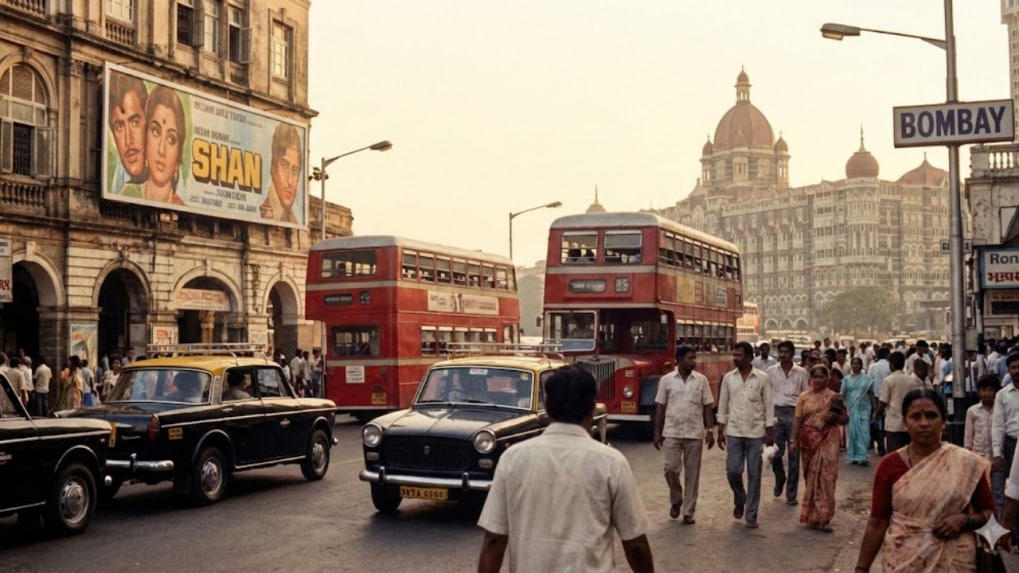
South Mumbai, 1980 Prompt: Visualize 18°55′57″N 72°49′54″E / 18.9325°N 72.8317°E in 1980
Delhi, Chandni Chowk, 1900 Prompt: Visualise 28.6505° N, 77.2303° E in 1900
New York, 1916 Prompt: Visualize 40.7422° N, 73.9880° W in 1916
For more immersive results, you can gradually advance decades in the prompt to watch your chosen location transform through time. Users can find coordinates of their cities through a simple Google search and substitute them into the prompts. The combination of Google Gemini AI and Nano Banana ensures that each image is rich in historical detail and visually striking.