

How to turn your selfie into a cinematic winter photo with Gemini AI
This guide explains how to recreate the snowy studio-style image shared by Nano Banana Labs on X, using the Google Gemini app.

ADVERTISEMENT
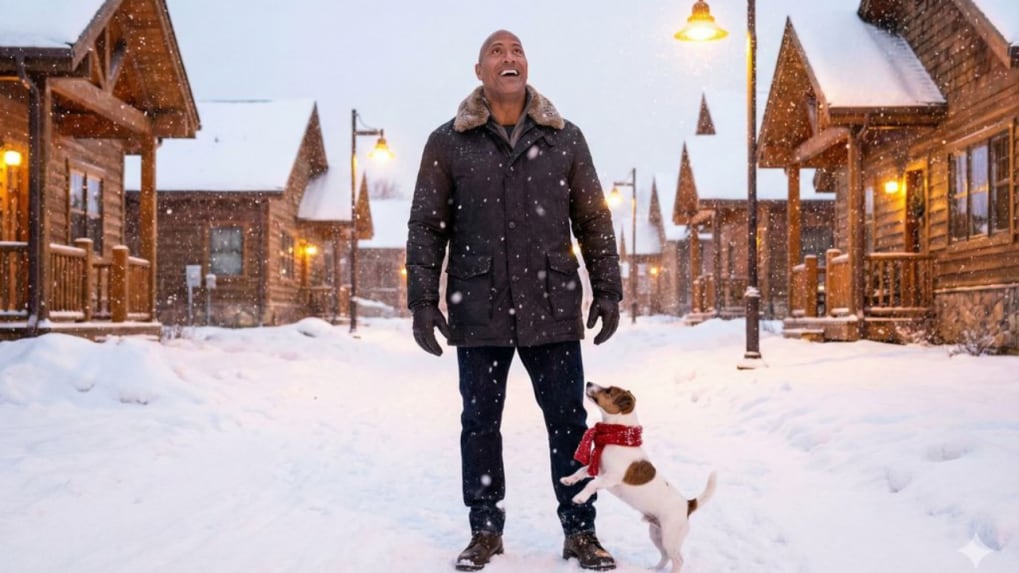
Nano Banana has been trending across social media for turning everyday selfies into cinematic, studio-quality images, as Google Gemini’s image-generation capabilities continue to evolve rapidly. From hyper-realistic lighting to emotionally rich scenes, creators are now using Gemini’s “Create image” feature alongside Nano Banana Pro prompts to produce viral visuals that look professionally shot. One such popular format is the winter snow portrait, which places users in a cosy, cinematic snowfall scene — often with a pet companion — using nothing more than a reference photo and a well-crafted prompt.
This guide explains how to recreate the snowy studio-style image shared by Nano Banana Labs on X, using the Google Gemini app.
Step-by-step: How to use Google Gemini with Nano Banana
Step 1: Download the Google Gemini app
Download the Google Gemini app from the Google Play Store or Apple App Store and sign in with your Google account.
Step 2: Open the image creation tool
Open the Gemini app and tap on the “Create image” option to access the image-generation interface.
Step 3: Upload your reference photo
Tap the plus icon, select Gallery, and upload a clear photo of yourself. For best results, use a photo where your face fills roughly 70 percent of the frame and is well lit.
Step 4: Find a Nano Banana prompt
Visit the X account @NanoBanana_Labs, browse through their image posts, and select a visual style you like. Copy the full text prompt provided in the post description.
Step 5: Paste and generate
How to create the snowy studio-style portrait
Use the following prompt exactly as provided by Nano Banana Labs to recreate the winter snow aesthetic:
Prompt:
A bright winter photograph shows the person attached in the uploaded reference image (keep the face 100% accurate) standing in a snowy street lined with wooden houses. Fresh snowflakes fall around them as they look up and smile like they’re seeing the first snow of the season. A small dog wearing a red scarf jumps near their feet. Warm yellow street lights shine through the snowfall. Aspect ratio 4:5
Once generated, you can rerun the prompt for variations or save the image directly from Gemini.